
In Let Agents Render the Platform, we described what MCP Apps are from a backend perspective and why we ship them: so that the charts, queries, and interactive UIs that live on Altertable can render inside any AI agent, with the same experience whether you're inside the product or inside an MCP host like Claude.
An agent that returns "your retention dropped 12%" isn't enough anymore. People want to hover the chart, rebucket the cohorts, tweak the date range. So how do you ship the same interactive UI to surfaces you don't control like a chat inside your product, a sandboxed iframe inside an MCP host, whatever comes next, without maintaining parallel implementations?
Let's walk through the frontend work that makes it possible.
Tools already have a shape
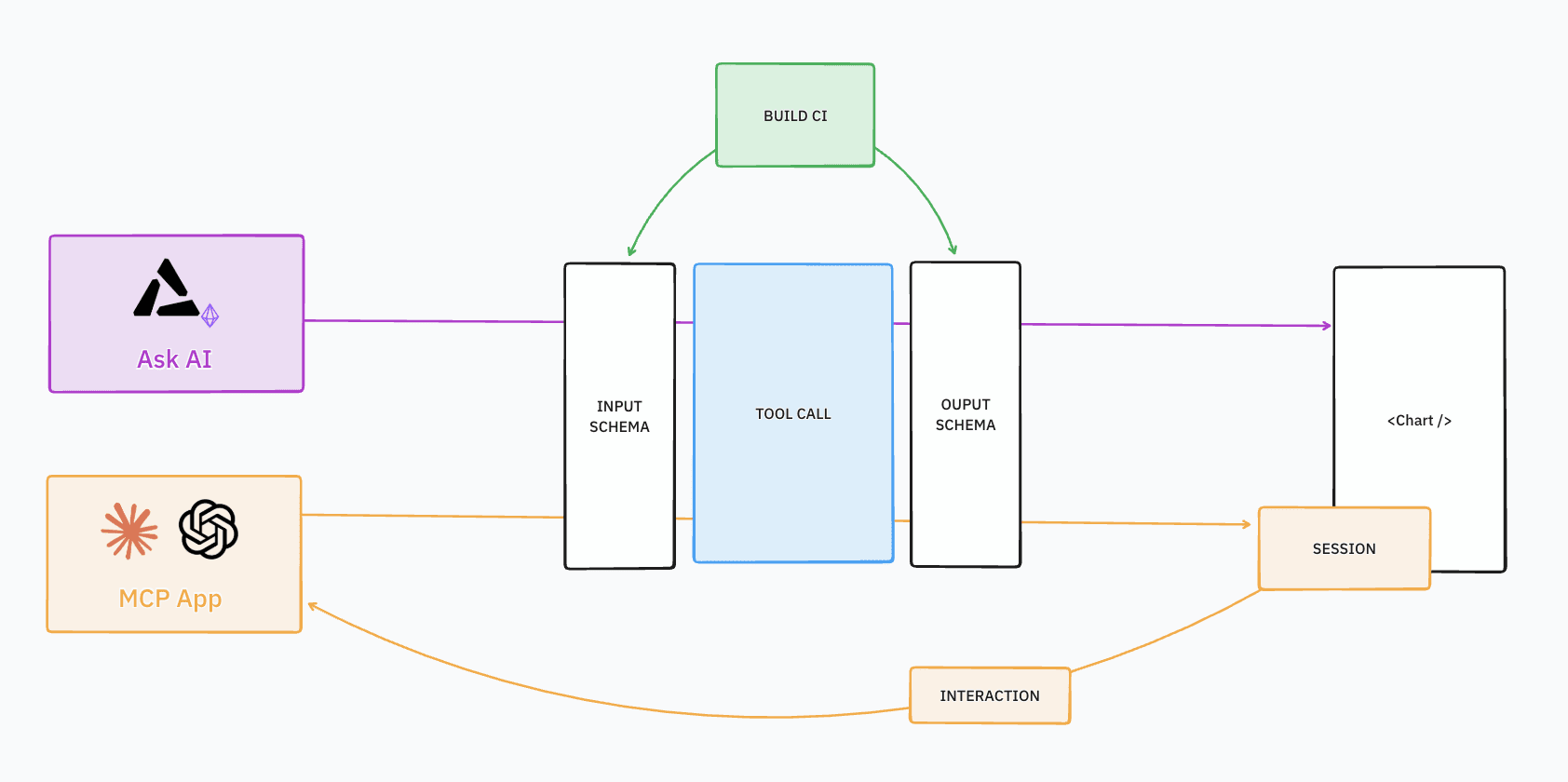
Our MCP server exposes tools, and every tool already declares a JSON Schema for its input and output. That's how agents know what to send and what to expect back.
We reuse those same schemas as the source of truth for the frontend. The types the frontend builds on are always the real ones, not a hand-maintained copy. When the backend changes a tool's shape, the build breaks before anyone writes rendering code against a stale type. Same contract for agents, same contract for the UI.
A codegen pipeline pulls the tool schemas from the backend API, converts each one into a Zod validation schema, and generates a TypeScript file per tool.
// Generated types for our query_lakehouse toolexport type Input = { statements: { statement: string }[] };export type Output = {results: {statement: string;columns: { name: string; type: string }[];rows: unknown[][];}[];};
That gives us typed inputs and outputs. But where does a component get its validated data from?
A tool definition is a contract
A raw tool result arrives from a host as unstructured JSON. If every component validates that itself, you get validation logic scattered across the codebase with inconsistent edge-case handling.
We centralize that in a tool definition: one type per tool, one place to validate.
type ToolDefinition<TInput, TOutput> = {name: string;inputSchema: ZodType<TInput>;outputSchema: ZodType<TOutput>;};
Three fields, all from codegen. The Zod schemas validate what goes in and what comes out.
Everything below this type – schemas, parsing, validation – is portable across surfaces. Everything above – icons, layout, summaries – is product-specific. When we added MCP Apps, nothing below the contract changed. What changed is that some tools needed more than a static render.
From snapshot to session
At this point we have typed data for any tool result. But getting the data once isn't enough. Someone sees a chart inside an MCP host and wants to tweak a variable. Someone sees a SQL result and wants to edit the query and re-run it.
We model this as a session. Each interactive tool defines a small config:
type McpToolSessionConfig<TInput, TToolResult, TInteraction> = {name: string;parsePayload: (payload: unknown) => TToolResult;buildArguments: (params: {toolResult: TToolResult;interaction: TInteraction;}) => TInput;getInitialInteraction?: (params: { toolResult: TToolResult }) => TInteraction;};
TToolResultis what the tool returns.TInteractionis what the user changes: variable overrides for an insight, a SQL statement for a query.buildArgumentsturns the current result plus the user's edit back into tool input.
A generic hook wraps this config: it holds state, calls the host via the MCP SDK, parses the response, and feeds the new result to the component.
The SQL tool's session config fits in a few lines:
const QueryLakehouseToolSession = {name: QueryLakehouseToolDefinition.name,getInitialInteraction({ toolResult }) {return toolResult.results.map(r => r.statement).join('\n');},buildArguments({ interaction }) {return { statements: [{ statement: interaction }] };},} satisfies McpToolSessionDefinition<QueryLakehouseInput,QueryLakehouseOutput,string>;
The component never touches callServerTool or parses a CallToolResult. It just receives typed data and exposes callbacks. That separation is what lets the same component work in two very different contexts.
Same component, two surfaces
All the layering above pays off here. Take the component that renders insight results: segmentation charts, funnels, retention curves, with a variable editor when the insight exposes parameters. Its props are a typed tool result, an optional callback for variable changes, and a loading flag.
In our in-product chat, the wrapper is minimal. The tool result comes from the conversation stream, already parsed. The chart is read-only:
function InsightDetails({ result }) {if (!result) return <DefaultDetails />;return <InsightViewer toolResult={result} />;}
In the MCP App, the wrapper adds a session. The tool result comes from the host, the session hook wires up re-execution, and the chart becomes interactive:
function InsightViewerApp({ toolResult, app, setError }) {const session = useMcpToolSession({initialToolResult: toolResult,app,setError,toolSessionConfig: InsightViewerToolSession,});return (<InsightViewertoolResult={session.toolResult}onVariablesChange={session.execute}isReloading={session.isBusy}/>);}
Same component, same props. In the chat it renders inline and read-only; in the MCP App it renders inside a sandboxed iframe with full re-execution.
Same story for the SQL playground: read-only in the chat, but in the MCP App the session hook connects the editor to the host so users can edit and re-run. Two apps so far, two thin wrappers. Which raises the question: how many more do we need?
One component or many?
Not every tool needs its own renderer. A tool that returns a list of events or a catalog description is fine as structured text. We only build a dedicated component when the user needs to interact with the result, like hovering a chart or editing a query. Two tools have dedicated apps today: the Insight Viewer and the SQL Playground.
All 30+ tools go through the same schema, parser, and validation. Adding a new app is scoped: write the component, write the parser, add a session config if it supports interaction. The schema is already generated, the hook is already there.
What this bought us
In practice, the layering means we catch problems early and add new surfaces cheaply:
- Schema: when the backend changes a tool's output, codegen updates the types and anything downstream either adapts or fails to compile.
- Definition: components never see raw payloads. One parser per tool, one place to fix when the shape changes.
- Session: the component doesn't know which host it's running in. It exposes callbacks, the session translates them into tool calls.
When we shipped MCP Apps, we didn't rewrite our charts. We wrote two thin wrappers and a session config each – the components were already there.
A side effect we didn't plan for: because every tool has a typed schema and a definition, AI coding agents can read the generated types and write a working session config or wrapper without us walking it through the architecture. Types are self-documenting.
What's next
Right now someone can tweak variables on an insight inside an MCP host and the chart reloads. But the interaction usually stops there. We want MCP Apps to be the bridge between the agent conversation and the full product: start exploring inside the agent, then continue seamlessly on Altertable when you need the full experience.
More tools will get dedicated apps as we learn which interactions belong in the UI and which belong in the conversation. There's also a packaging question: each MCP App currently ships its own React bundle inside the iframe. We expect this to be an industry-wide challenge. While we're on the lookout to see how people deal with this, we're exploring aliasing React to Preact in our MCP app bundling to keep the same component model with a fraction of the bundle size.
On the tooling side, Skybridge is building a full-stack framework around MCP Apps with type-safe hooks, dev tooling, and cross-client abstractions. We've started experimenting with it and it fills a lot of gaps the raw SDK leaves open.
We're also watching A2UI, where agents generate UI on the fly instead of serving pre-built bundles – a different bet on the same problem.
MCP Apps are new, AI agents evolve every week, and we keep discovering new ways to bridge agent runtimes UIs. We're figuring it out one component at a time.