Many event datasets need to answer the same question: which burst of activity does each row belong to? A user is active, then quiet for a while, then active again. Product analytics, clickstreams, and IoT traces all need to group nearby events and split them when the inactivity between consecutive events exceeds a threshold.
That grouping is a **session window**. Given a 30-minute gap, an event starts a new session only when it arrives more than 30 minutes after the previous event for the same key. The windows have no fixed duration: a session can remain open for hours if every consecutive event arrives within the gap. Each user, device, or other partition has its own sequence of sessions.
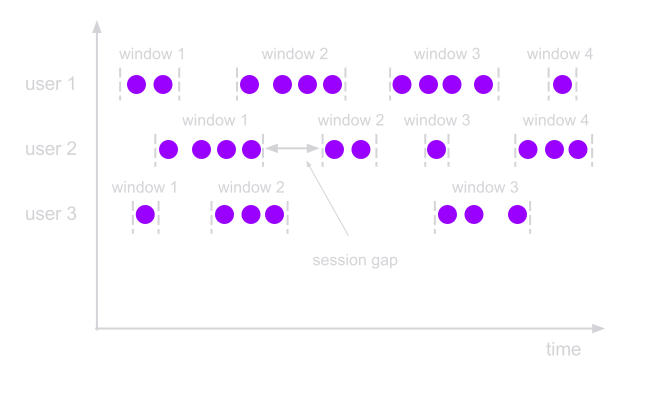
## Why we built this
The questions that follow that cut are ordinary. How long was the visit? Did they bounce? Which events sat in the same burst as the purchase? You cannot answer them from raw events. You need the session first.
DuckDB can already make the cut with window functions. The recipe is well known: `lag()` for the previous timestamp, a flag when the gap is too large, a cumulative `sum()` for session IDs, then a `GROUP BY` when you want one row per session. Teams rewrite it constantly. The SQL is right. It also spends two general-purpose window operators, plus an aggregation, on a rule the query already knew.
We hit the same shape while adding sequence analysis to DuckDB. MATCH_RECOGNIZE is the general case: funnels, optional steps, incomplete matches. Sessionization is the common special case, one gap threshold, no automata. DuckDB has no session-window primitive, the same way it had no `MATCH_RECOGNIZE`. This is the same DuckDB bet: extend the engine when the standard operator is missing, then make the workload fast enough to use.
## The standard window-function query
That window-function query has three stages, then a final aggregate to one row per session:
```sql
WITH gaps AS (
SELECT
user_id,
ts,
lag(ts) OVER (
PARTITION BY user_id
ORDER BY ts
) AS prev_ts
FROM events
),
boundaries AS (
SELECT
user_id,
ts,
CASE
WHEN prev_ts IS NULL
OR ts > prev_ts + INTERVAL 30 MINUTE
THEN 1
ELSE 0
END AS new_session
FROM gaps
),
sessionized AS (
SELECT
user_id,
ts,
sum(new_session) OVER (
PARTITION BY user_id
ORDER BY ts
ROWS BETWEEN UNBOUNDED PRECEDING AND CURRENT ROW
) AS session_id
FROM boundaries
)
SELECT
user_id,
session_id,
min(ts) AS session_start,
max(ts) AS session_end,
count(*) AS event_count
FROM sessionized
GROUP BY user_id, session_id
ORDER BY user_id, session_start;
```
`lag()` exposes the previous timestamp within each user’s ordered events. The first event and every event more than 30 minutes after its predecessor set `new_session` to 1. The cumulative sum turns those flags into session IDs that reset for each user.
## The SESSIONIZE operator
`SESSIONIZE` expresses the same rule in one clause. It partitions events by user, orders them by timestamp, and starts a new session whenever the gap between adjacent events exceeds 30 minutes. By default, it returns one row per input event and adds `session_id`, `session_start`, and `session_end`:
```sql
SELECT
user_id,
ts,
session_id,
session_start,
session_end
FROM events
SESSIONIZE (
PARTITION BY user_id
ORDER BY ts
GAP INTERVAL 30 MINUTE
);
```
`session_start` and `session_end` are the timestamps of the first and last observed events in the session. `PARTITION BY` is optional for datasets with a single event stream. Inside `SESSIONIZE`, the first `ORDER BY` expression is the time key, and additional expressions break ties between events with the same timestamp. This ordering defines the session sequence; it does not sort the final query result.
### One row per session
The default form annotates individual events. To return one row for each session instead, add `ONE ROW PER SESSION`. `MEASURES` defines the values to compute across each session; here, `count(*)` adds an `event_count` column:
```sql
SELECT
user_id,
session_start,
session_end,
session_id,
event_count
FROM events
SESSIONIZE (
PARTITION BY user_id
ORDER BY ts
GAP INTERVAL 30 MINUTE
MEASURES count(*) AS event_count
ONE ROW PER SESSION
)
ORDER BY user_id, session_start;
```
With `ONE ROW PER SESSION`, the operator no longer preserves each input row. Its output contains the partition keys, `session_start`, `session_end`, `session_id`, and the explicitly named measure columns. `event_count` exists only because the query defines `count(*) AS event_count`.
`MEASURES` accepts DuckDB aggregate expressions, including aggregates with `DISTINCT`, as well as `FIRST(x)` and `LAST(x)`. A bare column takes its value from the final event in the session. Expressions can combine those values and aggregates, so each session can include more than timestamps and a count without a second aggregation step.
## Why the window version costs more
Both approaches first partition events by user and sort them by timestamp. From there, `SESSIONIZE` assigns sessions in one pass: compare each timestamp with the previous one, start a new session when the gap is too large, and emit the session bounds.
The window-function query performs the same work through two general-purpose operations: `lag()` and a cumulative `sum()`. DuckDB’s window machinery supports many kinds of frames and aggregates, but this query only needs to add a stream of split flags.
`SESSIONIZE` avoids that extra machinery. The benchmark below measures the difference.
## Benchmark results
The benchmark ran on an Apple M4 Pro with a 14-core CPU and 48 GB of RAM. The synthetic dataset contains 10 million events across 20,000 users. Each session has 10 events one minute apart, sessions start 45 minutes apart, and the gap is 30 minutes. That produces 1 million sessions. Each number below is the median of five runs from the same optimized build, with tables loaded before timing.
We verified that every implementation produced 1 million sessions with 10 events each. Timings exclude a final result sort and the cost of transferring or materializing the results in a client.
### Dedicated operator vs window functions
Query
DuckDB lag + running sum
SESSIONIZE
Speedup
One row per session
0.430 s
0.125 s
3.4×
Per-event assignment
0.437 s
0.134 s
3.3×
The first row compares complete one-row-per-session queries. The standard query applies two window operations and then a `GROUP BY`; `SESSIONIZE` computes the count with `MEASURES` and emits one row per session directly. The second row compares only session assignment, with both queries preserving every event. `SESSIONIZE` is 3.4× faster for the session summary and 3.3× faster for per-event assignment.
### Where aggregation happens
The first benchmark compares `SESSIONIZE` with the window-function query. The next comparison asks a narrower question: once a query already uses `SESSIONIZE`, is it faster to compute aggregates inside the operator or in a later `GROUP BY`? Both columns below use `SESSIONIZE`.
Measures
Later GROUP BY
Inside SESSIONIZE
Speedup
count(*)
0.157 s
0.125 s
1.25×
count / sum / min / max
0.163 s
0.150 s
1.09×
Computing measures inside `SESSIONIZE` avoids emitting one row per event and hashing those rows in a later `GROUP BY`. That makes `count(*)` 1.25× faster. With `count`, `sum`, `min`, and `max` together, the improvement is smaller at 1.09×. Both approaches return the same results.
At their core, session windows need one rule: cut when the gap between adjacent events exceeds a threshold. `SESSIONIZE` expresses that rule directly and runs it 3.4× faster than the general-purpose window-function query on this workload.
## Getting the extension
`SESSIONIZE` ships in the same DuckDB extension as our earlier work on scalable row-pattern matching. We plan to publish it as a DuckDB community extension. Until then, email [support@altertable.ai](mailto:support@altertable.ai) for access.